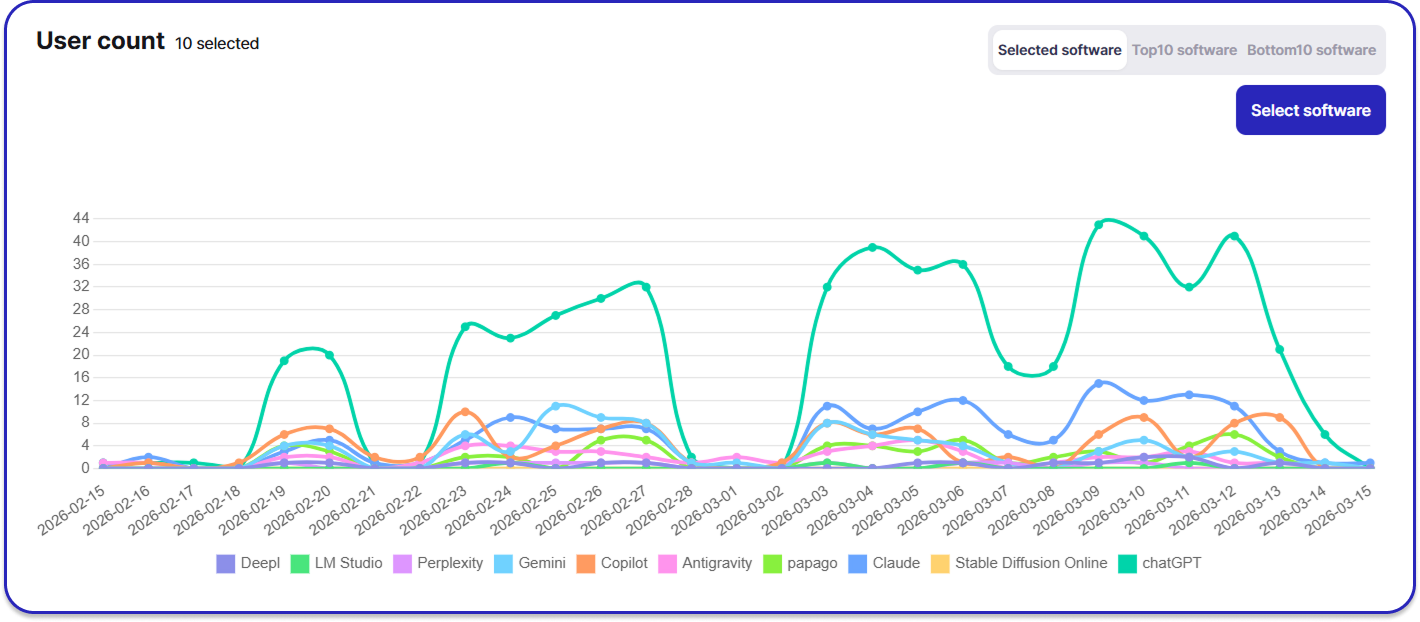
"As of 2026, enterprises are faced with a cold, hard question: 'Which AI agent translates into actual profit for our company?' beyond simply asking 'Which AI is the smartest?' In this era of Agentic AI, where hundreds of services launch daily, the market has ultimately consolidated into a powerful tripartite race: ChatGPT, Claude, and Gemini.
While these services may appear similar on the surface, their strategic directions and latest features (GWS CLI, Computer Use, etc.) are distinctively different. Currently, many companies either leave the choice to individuals or adopt a specific model without data-driven verification. However, an unprepared integration leads to 'cost leaks' and 'security holes.'
True AI productivity innovation starts not with a flashy chatbot interface, but with precise data management that supports it. Today, SELLEASE presents an in-depth analysis of these three models and provides a guide to the 'Real Data' you must verify to make a strategic AI selection."
The 2026 enterprise AI market is dominated by Agentic AI—agents that don't just answer questions but create plans and directly control systems. AI has evolved into a 'practical executor' that manipulates computers, generates documents, and navigates browsers autonomously.
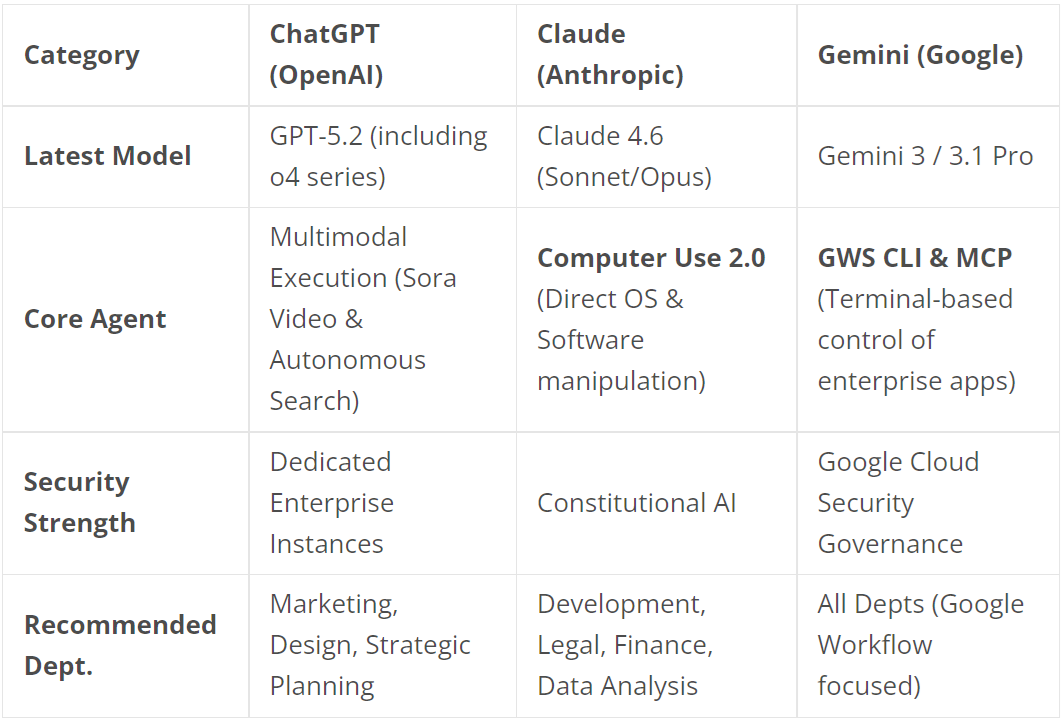
2026 AI adoption is a battle of how organically a model integrates with your company's 'Digital Workspace.'
OpenAI leads in multimodality, integrating Sora (Video) and DALL-E (Image) within ChatGPT to drive visual task automation.
from swarm import Swarm, Agent

client = Swarm()

# 1. Define specialized agent
sales_agent = Agent(
    name="Sales Agent",
    instructions="Answers sales-related questions.",
)

# 2. Handoff function
def transfer_to_sales():
    return sales_agent

# 3. User interaction agent
agent_a = Agent(
    name="Agent A",
    instructions="Starting consultation.",
    functions=[transfer_to_sales] # Passes to sales_agent for buying questions
)

# 4. Execute conversation
response = client.run(
    agent=agent_a,
    messages=[{"role": "user", "content": "I want to buy a product."}]
)

print(response.messages[-1]["content"])Anthropic established itself as an 'AI colleague for professionals' with the lowest hallucination rate. Through Claude Code, it has become the top agent for developers, offering plugins for various tools and nearly unlimited tokens via the Max plan.
import anthropic

# 1. Initialize client
client = anthropic.Anthropic()

# 2. Set computer tools & call model
response = client.beta.tools.messages.create(
    model="claude-3-5-sonnet-20241022", # Model with 2.0 features
    max_tokens=1024,
    tools=[{
        "type": "computer_20241022",
        "name": "computer",
        "display_height_px": 1080,
        "display_width_px": 1920,
        "display_number": 1
    }],
    messages=[{
        "role": "user",
        "content": "Search for 'claude code 2.0 github' on Google and enter the repository."
    }]
)

print(response)
Google evolved Gemini into an 'Operating System for Workspace' through the GWS CLI.
#!/bin/bash
# GWS CLI Workflow Example

echo "1. Downloading files from email..."
ATTACHMENT_ID=$(gws gmail messages list --q "subject:daily-report" --max 1 | jq -r '.[0].id' | xargs -I {} gws gmail messages get --id {} --format full | jq -r '.payload.parts[1].body.attachmentId')
gws gmail messages attachments get --id $ATTACHMENT_ID --messageId $(gws gmail messages list --q "subject:daily-report" --max 1 | jq -r '.[0].id') --file ./report.pdf

echo "2. Creating Drive folder and uploading..."
FOLDER_ID=$(gws drive files create --name "Daily_Reports" --mimeType application/vnd.google-apps.folder | jq -r '.id')
FILE_ID=$(gws drive files upload --file ./report.pdf --parents $FOLDER_ID | jq -r '.id')

echo "3. Sharing and notifying team members..."
gws drive permissions create --fileId $FILE_ID --type user --role reader --emailAddress team-member@example.com
gws gmail messages send --to team-member@example.com --subject "Report Shared" --body "Daily report has been shared."

echo "Workflow Complete!"Successful adoption requires a review in this order: [Infrastructure Compatibility] → [Core Business Domain] → [Technical Proficiency].
Compatibility with your primary collaboration tools determines 80% of your cost savings.
It is more efficient to configure a 'Portfolio' based on department needs.
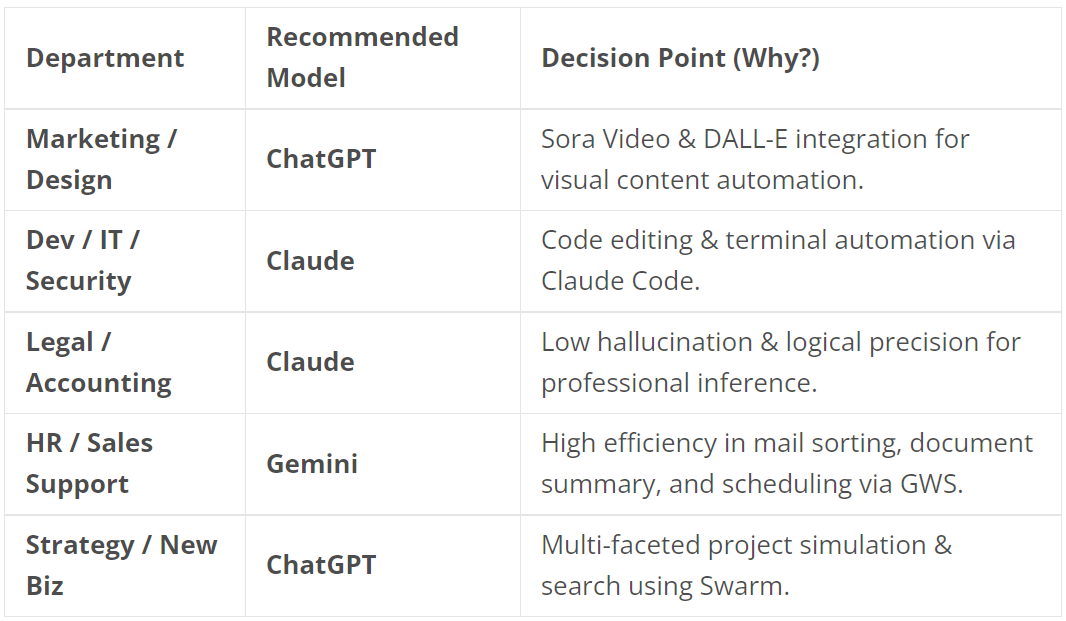
Innovation is wasted without proper management. SELLEASE ensures your AI remains an asset.